Projects
An aurora-cycler-manager 'project' is a folder on a filesystem containing a configuration file and some data.
The folder structure might look like this:
As a user you also have a 'user' config file stored in your user data directory (defined in platformdirs).
Connecting to an existing project
To view data from an existing set up, use:
Creating a new project
This generates subfolders, a blank sqlite3 database, and a configuration file in the folder.
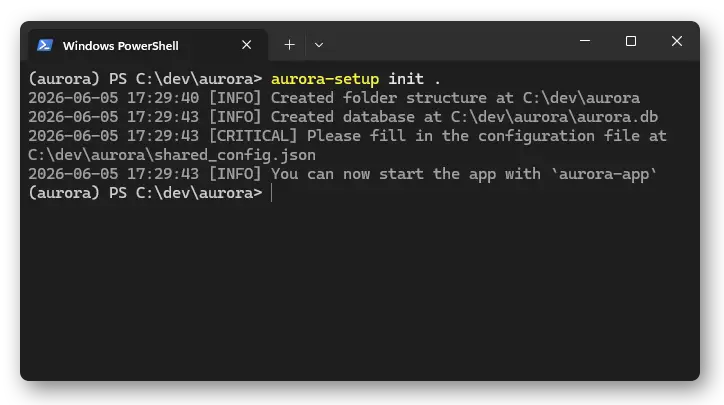
Check your project
To see where aurora is currently pointing, use
Editing the config
If you want to connect to cyclers or change columns, you need to modify the shared configuration file.
An example shared configuration looks like:
{
    "Database type" : "sqlite",
    "Database path" : "path/to/my-project/aurora.db",
    "Data folder path" : "path/to/my-project/data",
    "Protocols folder path" : "path/to/my-project/protocols",
    "Time zone" : "Europe/Zurich",
    "Servers" : {
        "neware001": {
            "hostname": "neware001",
            "username": "labuser",  # this will connect with 'ssh labuser@neware001'
            "server_type": "neware",  # can be 'neware', 'biologic', 'neware_harvester', 'biologic_harvester'
            "shell_type": "powershell",  # the shell used on ssh, should be 'cmd' or 'powershell'
            "data_path": "C:/data/",  # data is saved here from Neware BTS
            "protocol_path": "C:/protocols/",  # protocols are transferred here before being on the machine
            "neware_raw_data_path": "C:/Program Files (x86)/NEWARE/BTSServer80/NdcFile/"  # this probably shouldn't change
        },
        "neware002": {
            "hostname": "neware002",
            "username": "labuser",
            "proxy_hostname": "proxypc",
            "proxy_username": "proxyuser",  # you can proxy jump through another computer, if neware002 is on a private network
            "server_type": "neware_harvester",  # harvesters cannot control the cycler, only read data
            "shell_type": "powershell",
            "data_path": "C:/data/",
            "neware_raw_data_path": "C:/Program Files (x86)/NEWARE/BTSServer80/NdcFile/"
        },
        "bio1": {
            "hostname": "biologic001",
            "username": "labuser",
            "server_type": "biologic",
            "shell_type": "powershell",
            "data_path": "C:/data/",  # biologic does not need a protocol path, the .mps is stored in the same folder as the data
        },
    },
    "Sample database" : [
        {"Name": "Cell number", "Alternative names": ["Battery_Number"], "Type": "INT"},
        {"Name": "Rack position", "Alternative names": ["Rack_Position"], "Type": "INT"},
        {"Name": "N:P ratio", "Alternative names": ["Actual N:P Ratio"], "Type": "FLOAT"},
        # ... lots more fields for the samples table in the database, you can add more if you want.
        # 'Alternative names' are normalised to the Name on sample import
        # Several columns are required and automatically added, like Sample ID, Run ID, Label.
        # You can also remove columns, but some provide special functionality,
        # e.g. 'N:P ratio' is calculated for you if all required columns exist.
    ]
}
If you make changes to the database columns, you can update the database with aurora-setup update, use the option --force if you are permanently deleting columns and their data. You do not need to update after changing server details, just restart the app/daemon.
By default, aurora is set up with sqlite3, if you want to use a postgresql database instead, change your configuration to:
{
    "Database type" : "postgresql",
    "Database host" : "<your-hostname>",
    "Database name" : "<your-db-name>",
    "Database user" : "<your-db-username>",
    "Database password" : "<your-very-secure-plaintext-password>",
    #... everything else is the same
}
aurora-setup update to generate the tables. This requires you to have already installed and set up postgres, and created the database and users. Creating the table schema requires a superuser.