Installing cycler APIs
If you want to control cyclers through aurora-cycler-manager, you must install an API on the cycler machine.
If you just want to fetch and convert .mpr/.nda/.ndax data, you do not need to install an API. In your configuration, set the server type to "neware_harvester" or "biologic_harvester", and skip to the SSH setup step.
Neware BTS8
The server type "neware" uses aurora-neware to control Neware cyclers using BTS8. This is tested and working reliably on BTS Client 8.0.0.478(2024.06.24)(R3). Earlier versions have known bugs, where some API commands work but others fail.
The Neware API protocol, and by extension aurora-neware, is only compatible with BTS Client 8.x. BTS Client 9.x is designed for different cycler hardware and does not support the API.
On the cycler PC, with Python >3.10:
Ensure that the cycler has the API enabled -- in BTS8 you need to go to Help -> Mode settings and paste the activation key. For us, it was G6DDA43153607E707130963000810000000000001 on all cyclers, this may work for you, otherwise contact Neware support for a key.
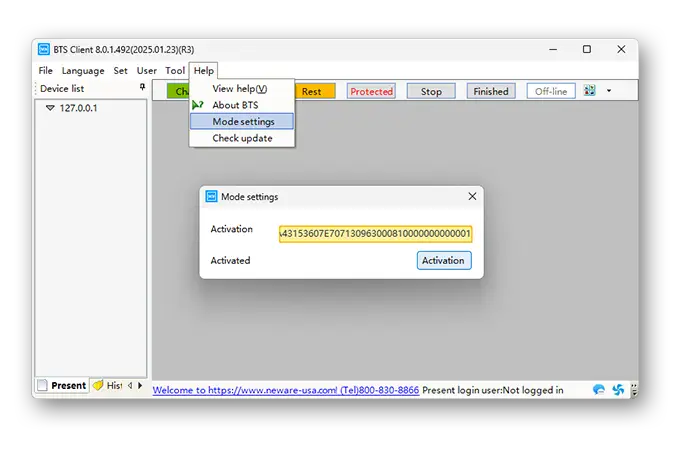
To test if it is working, try:
You should see the status of all connected channels as JSON.
Biologic EC-Lab
The server type "biologic" uses aurora-biologic to control Biologic cyclers (e.g. MPG, VSP, VMP) using EC-lab. This is tested and working reliably on MPG2 cyclers with EC-lab 11.52 - 11.63.
aurora-biologic uses OLE-COM to control the EC-lab graphical interface. Installation details can be found on the GitHub page, in short:
cd "C:/Program files (x86)/EC-lab"  # Go to EC-lab folder
./eclab /regserver                  # Register EC-lab COM server
pip install aurora-biologic         # Install the aurora-biologic package
biologic --help                     # See commands
To give the devices a name, instead of a serial number, fill in the config file at C:\Users\<user>\AppData\Local\aurora-biologic\config.json, which will look like:
{
    "serial_to_name": {
        "12345": "MPG2-1",
        "12346": "MPG2-2"
    },
    "eclab_path": "C:/Program Files (x86)/EC-Lab/EClab.exe"
}
You can then check the API is working:
Due to quirks with OLE-COM, to run these commands over SSH you must start the aurora-biologic daemon on the cycler PC while logged in with a graphical Windows interface:
Check that commands run correctly through the daemon using the --ssh flag:
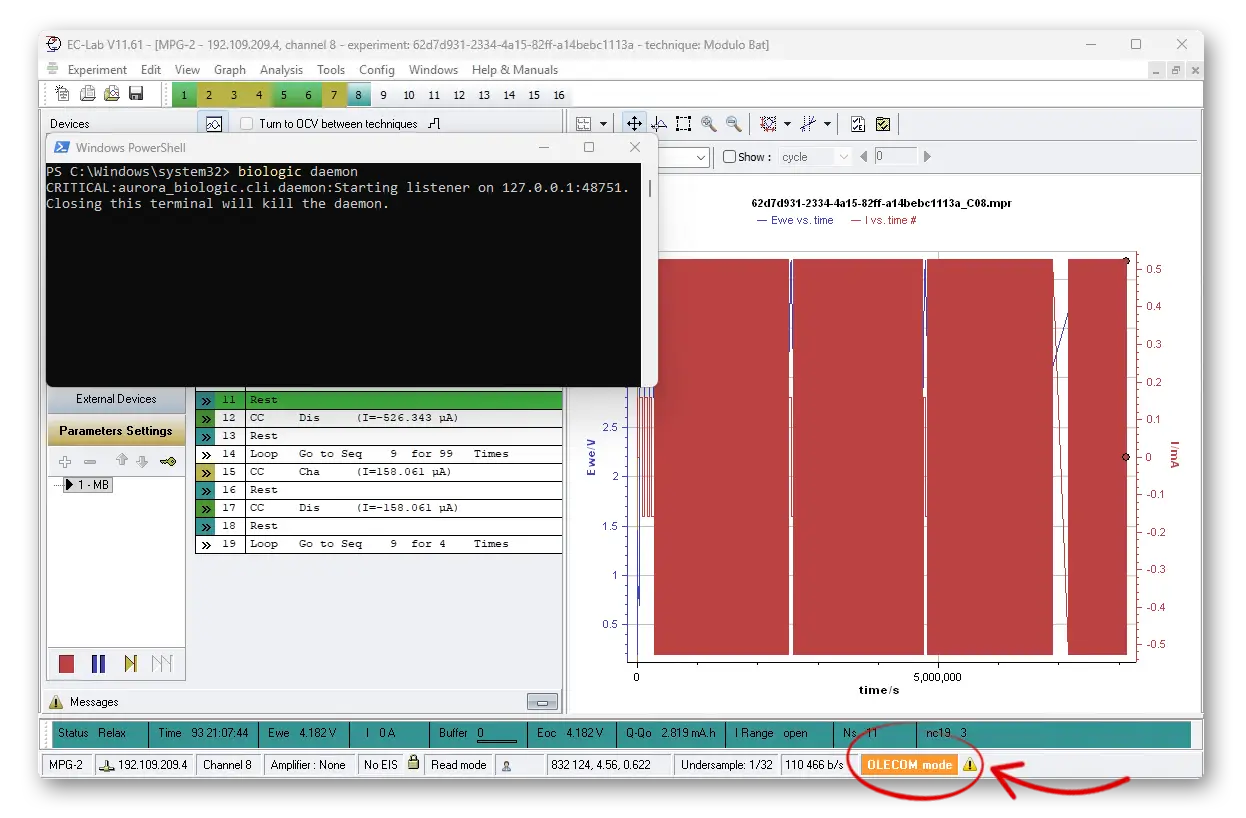
When using the API, you should see the "OLECOM" warning briefly appear on EC-lab while it is controlling the application.
Updating the configuration file
For Aurora to connect to the cyclers, you must put the details in config. For example in the config:
"Servers" : {
    "nw1": {  # The key / label for the server - should stay the same for one machine after setting
        "hostname": "neware001",  # or the full IP address
        "username": "labuser",  # this will connect with 'ssh labuser@neware001'
        "server_type": "neware",  # can be 'neware', 'biologic', 'neware_harvester', 'biologic_harvester'
        "shell_type": "powershell",  # the shell used on ssh, should be 'cmd' or 'powershell'
        "data_path": "C:/data/",  # data is saved here from Neware BTS
        "harvester_folders": ["C:/manual_data1/", "C:/manual_data2/"],  # list of other folders whose data is synced
        "protocol_path": "C:/protocols/",  # protocols are transferred here before being on the machine
        "neware_raw_data_path": "C:/Program Files (x86)/NEWARE/BTSServer80/NdcFile/"  # neware-specific - probably shouldn't change
    },
    ... # more cyclers
},
The available server types are neware, neware_harvester, biologic, and biologic_harvester.
The _harvester server types do not control cyclers, they just search in the data_path for new .mpr/.ndax data. Use the harvester_folders to tell Aurora which folders to check for new data. This works on both normal and harvester server types.